Professional Tutorials
Stake your $ATONE Tokens with Provalidator — AtomOne

" height="40px" id="HOyUAWctN" width="40px"/><path d="M 13.198 2.603 C 13.612 2.603 13.983 2.409 14.221 2.106 C 14.403 1.879 14.502 1.595 14.501 1.304 C 14.501 0.907 14.324 0.55 14.039 0.313 C 13.805 0.111 13.507 0 13.198 0 C 12.888 -0.001 12.59 0.111 12.356 0.313 C 12.065 0.56 11.897 0.922 11.898 1.304 C 11.898 1.606 12.002 1.886 12.175 2.106 C 12.421 2.421 12.798 2.604 13.198 2.603 Z M 4.799 5.576 C 6.37 3.851 8.433 2.649 10.709 2.133 L 10.417 0.371 C 7.725 0.96 5.269 2.388 3.421 4.443 L 4.796 5.576 Z M 4.797 20.821 L 3.421 21.954 C 5.268 24.009 7.724 25.437 10.417 26.027 L 10.709 24.265 C 8.432 23.748 6.369 22.546 4.797 20.821 Z M 15.692 24.265 L 15.984 26.027 C 18.677 25.435 21.133 24.009 22.98 21.954 L 21.602 20.821 C 20.036 22.546 17.964 23.749 15.692 24.265 Z M 12.321 24.142 C 12.062 24.38 11.898 24.721 11.898 25.101 C 11.898 25.409 12.004 25.694 12.185 25.916 C 12.432 26.223 12.804 26.401 13.197 26.4 C 13.591 26.401 13.963 26.223 14.21 25.916 C 14.395 25.692 14.501 25.409 14.501 25.101 C 14.501 24.721 14.337 24.38 14.076 24.142 L 14.074 24.142 C 13.843 23.927 13.534 23.797 13.197 23.797 C 12.872 23.796 12.558 23.919 12.321 24.142 Z M 15.984 0.371 L 15.692 2.133 C 17.964 2.648 20.036 3.851 21.602 5.576 L 22.98 4.443 C 21.133 2.388 18.677 0.962 15.984 0.371 Z M 25.761 9.147 L 24.094 9.777 C 24.801 11.999 24.801 14.397 24.112 16.627 L 25.777 17.253 C 26.612 14.62 26.608 11.776 25.761 9.147 Z M 24.709 18.266 C 24.472 18.044 24.158 17.92 23.833 17.921 C 23.508 17.92 23.194 18.043 22.957 18.266 C 22.698 18.503 22.534 18.844 22.534 19.224 C 22.534 19.533 22.64 19.818 22.821 20.04 C 23.067 20.346 23.44 20.524 23.833 20.524 C 24.241 20.524 24.608 20.336 24.845 20.04 C 25.031 19.816 25.137 19.533 25.137 19.224 C 25.137 18.844 24.973 18.503 24.712 18.266 Z M 22.957 6.22 C 22.698 6.458 22.534 6.799 22.534 7.178 C 22.534 7.487 22.64 7.772 22.821 7.994 C 23.068 8.301 23.44 8.478 23.833 8.478 C 24.226 8.478 24.599 8.301 24.845 7.994 C 25.031 7.77 25.137 7.487 25.137 7.178 C 25.137 6.799 24.973 6.458 24.712 6.22 L 24.71 6.22 C 24.479 6.004 24.17 5.875 23.833 5.875 C 23.508 5.874 23.194 5.997 22.957 6.22 Z M 2.305 9.777 L 0.638 9.147 C -0.208 11.776 -0.212 14.62 0.623 17.253 L 2.288 16.627 C 1.599 14.397 1.599 11.999 2.305 9.777 Z M 1.687 18.266 C 1.428 18.503 1.264 18.844 1.264 19.224 C 1.264 19.533 1.37 19.818 1.551 20.04 C 1.798 20.346 2.17 20.524 2.563 20.524 C 2.957 20.524 3.329 20.346 3.576 20.04 C 3.761 19.816 3.867 19.533 3.867 19.224 C 3.867 18.844 3.703 18.503 3.442 18.266 L 3.44 18.266 C 3.209 18.05 2.9 17.921 2.563 17.921 C 2.238 17.92 1.924 18.043 1.687 18.266 Z M 3.44 6.22 C 3.202 5.998 2.889 5.874 2.563 5.875 C 2.238 5.874 1.924 5.997 1.687 6.22 C 1.428 6.458 1.264 6.799 1.264 7.178 C 1.264 7.487 1.37 7.772 1.551 7.994 C 1.798 8.301 2.17 8.478 2.563 8.478 C 2.957 8.478 3.329 8.301 3.576 7.994 C 3.761 7.77 3.867 7.487 3.867 7.178 C 3.867 6.799 3.703 6.458 3.442 6.22 Z M 12.998 15.08 C 13.124 15.151 13.275 15.151 13.396 15.08 L 14.748 14.311 C 14.869 14.24 14.947 14.11 14.947 13.969 L 14.947 12.43 C 14.947 12.289 14.869 12.159 14.748 12.088 L 13.396 11.319 C 13.273 11.249 13.122 11.249 12.998 11.319 L 11.651 12.088 C 11.525 12.159 11.452 12.289 11.452 12.43 L 11.452 13.969 C 11.452 14.11 11.528 14.241 11.651 14.311 Z M 14.074 19.049 C 13.836 18.827 13.523 18.703 13.197 18.704 C 12.872 18.703 12.558 18.826 12.321 19.049 C 12.062 19.287 11.898 19.628 11.898 20.007 C 11.898 20.316 12.004 20.601 12.185 20.823 C 12.432 21.13 12.804 21.307 13.197 21.307 C 13.605 21.307 13.972 21.119 14.21 20.823 C 14.395 20.599 14.501 20.316 14.501 20.007 C 14.501 19.628 14.337 19.287 14.076 19.049 Z M 12.185 5.579 C 12.004 5.804 11.898 6.087 11.898 6.396 C 11.898 6.759 12.049 7.105 12.317 7.351 C 12.552 7.564 12.856 7.696 13.197 7.696 C 13.524 7.696 13.839 7.573 14.078 7.351 C 14.337 7.113 14.501 6.772 14.501 6.396 C 14.501 6.087 14.395 5.802 14.21 5.579 C 13.972 5.281 13.605 5.093 13.197 5.093 C 12.804 5.092 12.431 5.271 12.185 5.579 Z M 16.459 6.21 L 15.84 7.867 C 20.15 10.037 20.148 16.365 15.84 18.533 L 16.459 20.19 C 22.279 17.431 22.274 8.965 16.459 6.21 Z M 10.56 7.867 L 9.941 6.21 C 4.126 8.965 4.121 17.431 9.941 20.19 L 10.56 18.533 C 6.252 16.365 6.25 10.037 10.56 7.867 Z" fill="rgb(255, 255, 255)" height="26.39990506627607px" id="u1xljS75i" transform="translate(6.8 6.8)" width="26.399814820802703px"/></g></svg>)
Introduction
AtomOne is a blockchain initiative developed to address concerns from the Cosmos Hub community around centralization, security, and governance inefficiencies. Designed as a minimal fork of Gaia (Cosmos Hub), AtomOne aims to provide a more inclusive, adaptable blockchain governance model that specifically tackles these issues.
As a decentralized, streamlined blockchain, AtomOne serves as both an Inter-Blockchain Communication (IBC) and Interchain Security (ICS) enabled hub. Its primary objectives are to:
Prioritize security, adaptability, and inclusivity within the Cosmos ecosystem
Enhance decentralized governance processes
Promote self-organization
Serve as a neutral foundation for specialized hubs
Foster innovation while minimizing risks
In the long term, AtomOne aspires to be a low-risk, highly reliable hub that complements and strengthens the broader Cosmos ecosystem.
In this comprehensive guide, we will walk you through the straightforward process of delegating your ATONE tokens with Provalidator.
Follow these simple steps to embark on your journey to staking success.
Step-by-Step Staking Guide:
For this guide, we are using the Leap wallet.
Step 1. Set-up a wallet and Fund your tokens
Install Leap Wallet: Download the Leap Wallet extension and effortlessly access it within your browser.
Create or Import: Click Create new wallet or Import an existing wallet.
Secure Your Assets: Prioritize the security of your holdings by storing the recovery phrase and create a password.
Check your $ATONE allocation: Head to https://govgen.io/#trackers and just paste you Cosmos Hub address to see your allocation, and make sure your wallet is funded.
Step 2. Delegate to Provalidator
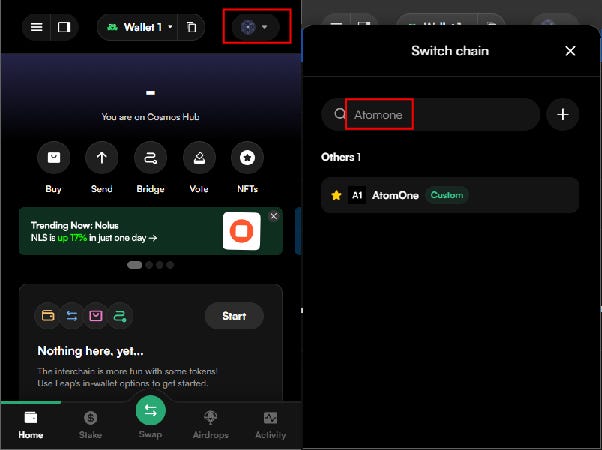
Open your Leap wallet extension and switch the network to the AtomOne chain.
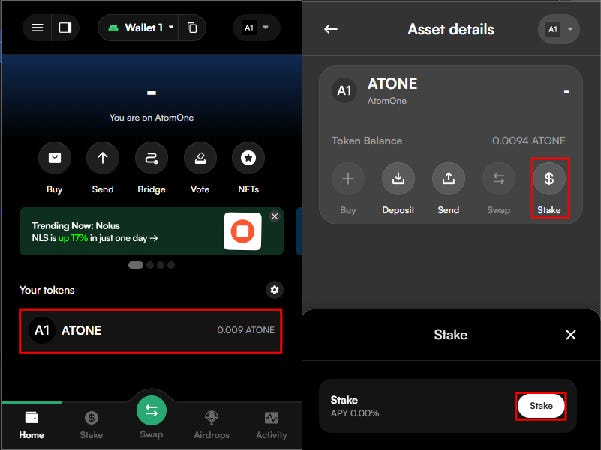
2. On the AtomOne chain page, navigate to your tokens page and select Stake.
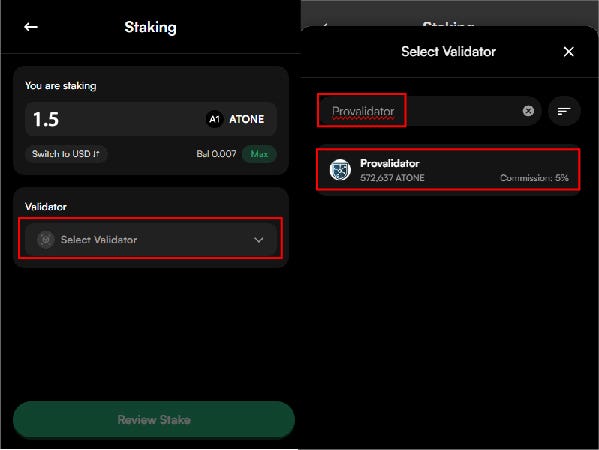
3. Enter the amount of $ATONE you’d like to stake, then click Select Validator. In the search bar, type “Provalidator” and select it from the list.
4. Click Review Stake. After verifying that all details are correct, click Confirm Stake.
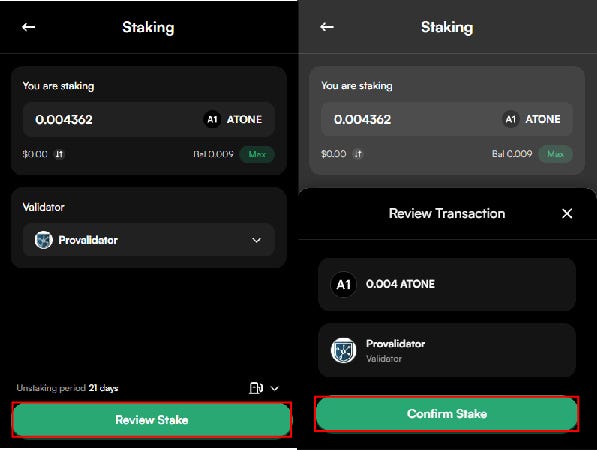
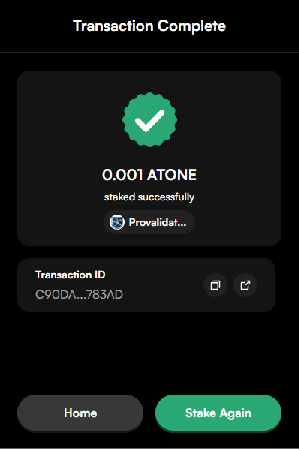
5. Once the transaction is complete with the image below, your funds has been successfully delegated.
Press enter or click to view image in full size
About Provalidator
Provalidator is a professional Proof-of-Stake blockchain validator and decentralized infrastructure provider. We offer enterprise-level validation services to more than 30+ blockchain networks, safeguarding over $250 million (as of December 2022) in digital assets through our robust infrastructure. Our team has been operating validator nodes since 2018 starting with the Cosmos Hub, and is currently one of the most prominent validators in the Cosmos ecosystem.
At the heart of our operations is validator service, which are specialized servers or nodes in a blockchain network tasked with proposing, authenticating transactions, and incorporating new blocks into the blockchain. Our dedicated team is on standby around the clock, ensuring swift responses to any validator node concerns. We’ve implemented multi-layered security and monitoring systems to safeguard our infrastructure and prioritize interests of our delegators.