Professional Tutorials
Stake your $XPRT Tokens with Provalidator — Persistence

" height="40px" id="LEfoAbzZI" width="40px"/><g d="M 13.522 10.196 C 13.522 11.211 13.286 12.143 12.814 12.993 C 12.343 13.825 11.618 14.499 10.641 15.015 C 9.663 15.531 8.45 15.789 7.001 15.789 L 4.322 15.789 L 4.322 22.081 L 0 22.081 L 0 4.553 L 7.002 4.553 C 8.417 4.553 9.613 4.794 10.591 5.277 C 11.568 5.76 12.301 6.426 12.79 7.274 C 13.278 8.123 13.523 9.097 13.523 10.196 Z M 6.673 12.393 C 7.499 12.393 8.113 12.202 8.518 11.819 C 8.922 11.436 9.124 10.895 9.124 10.196 C 9.124 9.497 8.922 8.956 8.518 8.573 C 8.113 8.19 7.498 7.999 6.673 7.999 L 4.322 7.999 L 4.322 12.393 Z M 13.522 0 L 0 0 L 0 3.005 L 13.522 3.005 Z" fill="transparent" height="22.081301161913387px" id="nRlnBpjDE" transform="translate(13.496 10.407)" width="13.52260162601624px"><path d="M 13.522 5.643 C 13.522 6.659 13.286 7.591 12.814 8.44 C 12.343 9.272 11.618 9.946 10.641 10.462 C 9.663 10.978 8.45 11.236 7.001 11.236 L 4.322 11.236 L 4.322 17.528 L 0 17.528 L 0 0 L 7.002 0 C 8.417 0 9.613 0.241 10.591 0.724 C 11.568 1.207 12.301 1.873 12.79 2.722 C 13.278 3.57 13.523 4.544 13.523 5.643 Z M 6.673 7.84 C 7.499 7.84 8.113 7.649 8.518 7.266 C 8.922 6.883 9.124 6.342 9.124 5.643 C 9.124 4.944 8.922 4.403 8.518 4.02 C 8.113 3.637 7.498 3.446 6.673 3.446 L 4.322 3.446 L 4.322 7.84 Z" fill="rgb(255, 255, 255)" height="17.528455207018368px" id="sHRGJY2jx" transform="translate(0 4.553)" width="13.52260162601624px"/><path d="M 13.522 0 L 0 0 L 0 3.005 L 13.522 3.005 Z" fill="rgb(229, 150, 54)" height="3.0048780487804834px" id="vPOw_CVJJ" transform="translate(0 0)" width="13.521951219512175px"/></g></g></svg>)
Introduction:
The primary objective of Persistence is to become a central hub for liquid staking, providing a user-friendly and efficient staking and DeFi platform for Proof-of-Stake (PoS) participants. This involves empowering developers to create innovative applications centered around staked assets.
The Persistence Core-1 chain plays a vital role in enabling the creation and utilization of liquid-staked assets (stkASSETs) through the pSTAKE mechanism. This allows users to not only earn staking rewards but also actively engage in DeFi activities like borrowing, lending, and providing liquidity on decentralized exchanges. Furthermore, the Core-1 chain supports the deployment of decentralized applications (DApps) through Smart Contracts, thanks to its integration of CosmWasm.
In this comprehensive guide, we will walk you through the straightforward process of delegating your XPRT tokens with Provalidator, enabling you to harness the potential for earning impressive returns of approximately 14.97%.
Follow these simple steps to embark on your journey to staking success.
Step-by-Step Staking Guide:
For this guide, we are using the Keplr wallet.
Step 1. Set-up a wallet and Fund your tokens
Install Keplr Wallet: Download the Keplr Wallet extension and effortlessly access it within your browser.
Create or Import: Click Create new wallet or Import an existing wallet.
Secure Your Assets: Prioritize the security of your holdings by storing the recovery phrase and create a password.
Deposit XPRT: Fund your tokens to the newly created address with XPRT.
Step 2. Access your Kelpr Dashboard
Access the Keplr Dashboard by selecting “Manage Portfolio” within the Keplr extension’s interface.
Step 3. Delegate to Provalidator
After entering the dashboard, locate to the Chains tab and click it.
Press enter or click to view image in full size
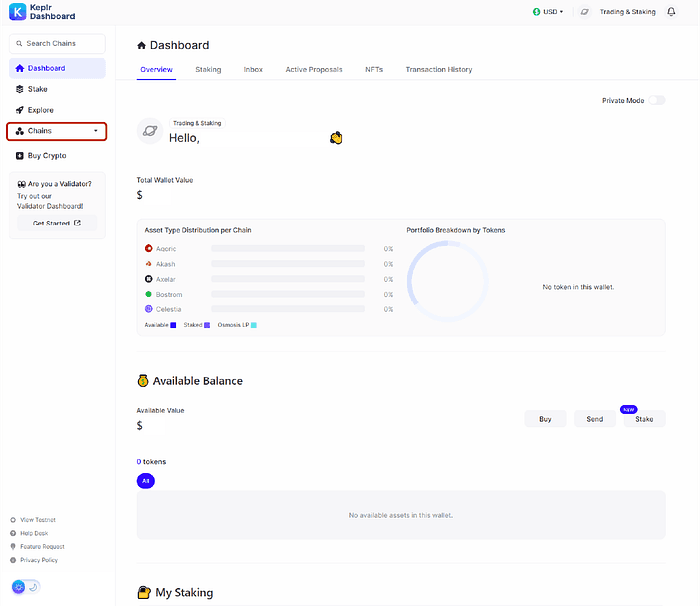
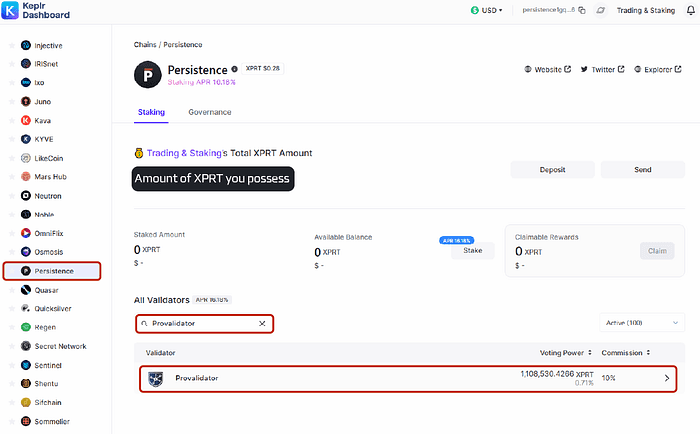
2. Proceed the Persistence chain page, and locate and search for Provalidator in the Validator search and select it.
Tip : You can search by “Provalidator” or entering in the Validator Address : persistencevaloper1aje9dcrunpsq47nfj4lt84fp74n8nprsmfhwyg
(Blockexplorer link : PERSISTENCE Validator — Mintscan)
Press enter or click to view image in full size
Press enter or click to view image in full size
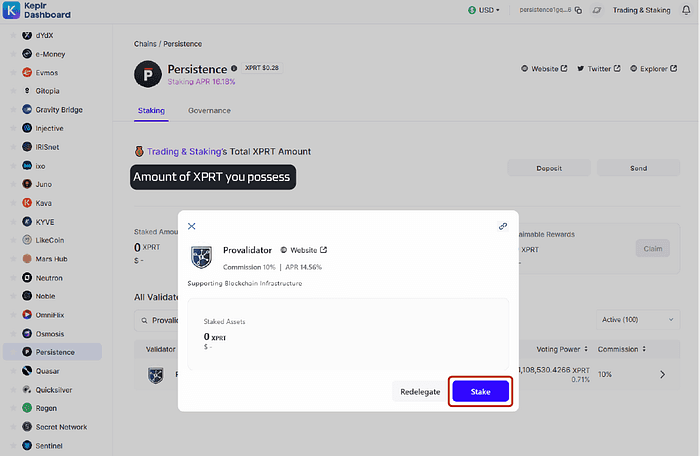
3. Input the preferred quantity of XPRT for staking and then proceed by selecting the Stake option.
Press enter or click to view image in full size
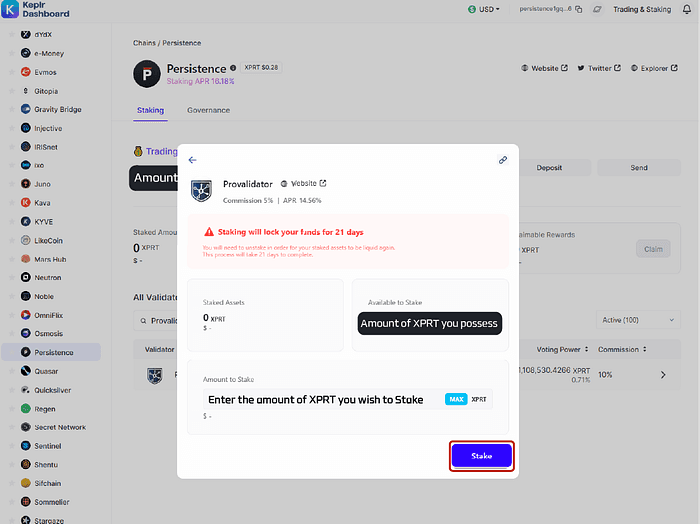
4. After verifying that all details are accurate, confirm your transaction. Once the process is completed, your funds will be successfully delegated.
About Provalidator
Provalidator is a professional Proof-of-Stake blockchain validator and decentralized infrastructure provider. We offer enterprise-level validation services to more than 30+ blockchain networks, safeguarding over $250 million (as of December 2022) in digital assets through our robust infrastructure. Our team has been operating validator nodes since 2018 starting with the Cosmos Hub, and is currently one of the most prominent validators in the Cosmos ecosystem.
At the heart of our operations is validator service, which are specialized servers or nodes in a blockchain network tasked with proposing, authenticating transactions, and incorporating new blocks into the blockchain. Our dedicated team is on standby around the clock, ensuring swift responses to any validator node concerns. We’ve implemented multi-layered security and monitoring systems to safeguard our infrastructure and prioritize interests of our delegators.